Temu and Shein 2026: How to Scrape Products and Track Trends - A Step-by-Step Guide
Sumário do artigo
- Introduction
- Preparation
- Basic concepts
- Step 1: define scraping goals and metrics
- Step 2: prepare the working environment and network
- Step 3: understand the anti-bot features of temu and shein
- Step 4: extract product cards from category lists and searches
- Step 5: scrape product cards on temu
- Step 6: scrape product cards on shein
- Step 7: structure data, eliminate duplicates, set up storage
- Step 8: gather prices, promotions, and shipping considering regions and timing
- Step 9: identify winning products and predict demand
- Step 10: the role of mobile proxies across regions and how to set them up correctly
- Step 11: automate daily runs and reports
- Step 12: check the results
- Step 13: common mistakes and solutions
- Step 14: advanced features
- Faq
- Conclusion
Introduction
In this practical guide, you'll learn how to set up a working scraping pipeline for Temu and Shein for 2026, starting from the initial connectivity check to daily updates of prices, images, variations, and demand metrics. By the end, you'll have a reproducible process that identifies winning products and forecasts trends for dropshipping while considering real anti-bot policies and regional price variations.
This guide is for beginner dropshippers, marketers, analysts, and small online store owners. The material is structured to help you achieve results without deep programming knowledge, while also including sections on advanced features for expansion.
What you need to know in advance: basic browser usage, understanding what proxies are and why regions matter for Temu and Shein prices. If you’ve heard of JSON, cookies, and headers, it will be easier, but it’s not essential. We’ll explain all the key concepts.
How much time it will take: basic setup in 3-4 hours, the first stable data run in 1 working day, automation and reports in 1-2 days. Full operation—with daily updates—will start delivering results within the first week.
Preparation
Before you start, gather your tools and create a secure environment. This will reduce errors and speed up your workflow.
Essential Tools
- A modern browser with developer mode.
- A text editor or spreadsheet to document settings and results.
- A task manager to plan daily runs.
- A storage solution: local folders for images and CSV files, preferably with database connectivity.
- Proxies with mobile IP for stable access to Temu and Shein in required regions.
System Requirements
- OS: Windows 10/11, macOS 12+, or any supported Linux system.
- RAM: at least 8 GB, preferably 16 GB for parallel tasks.
- Disk space: 10-50 GB for images and logs.
- Reliable internet of 20+ Mbps for stable media downloads.
What to Install and Set Up
- A browser with developer mode enabled. Check the Network and Storage tabs.
- Task scheduler: the OS’s built-in scheduler or any equivalent.
- Network testing tools: IP checker, DNS Leak Test, Proxy Checker, latency map, proxy calculator, browser fingerprint generator. These free utilities will help quickly verify that you are seeing regional prices correctly.
- Project folders: data/raw for raw HTML and JSON, data/images for images, data/csv for exports, logs for request logs.
Backups
- Once a day, copy data and logs folders to a separate archive.
- For CSV, use a copy with the date in the filename.
- If using a database, set up a daily dump.
✅ Verification: You should have a working folder structure: data/raw, data/images, data/csv, and logs, access to IP and latency testing tools, and a recorded plan for the first run.
Tip: Keep a log of your actions from the start: date, what you did, what you changed, any errors encountered. This saves hours during debugging.
Basic Concepts
Key Terms in Simple Language
- Product Card: a page or entry with a name, price, photo, size, colors, rating, and other fields.
- Session: a continuous period of interaction with a site from one IP and one browser profile.
- IP Rotation: automatic switching of IP over a specified time.
- Regional Price: a cost that depends on the country, city, or provider.
- Anti-Bot: mechanisms that identify suspicious activity and restrict access.
Core Principles
- Make few requests over short periods and maintain stable sessions.
- Respect robots.txt and the terms of use of the platforms.
- Store raw materials: HTML, JSON responses, timestamps.
- Always verify the region of visible prices using IP checks and latency maps.
What’s Important to Understand
- Temu and Shein display products and prices differently across regions and devices. Mobile IPs help see the same prices as real customers using smartphones.
- The interface may load data dynamically. Sometimes product cards arrive in JSON format rather than static HTML.
- Update frequency matters: trends do not last long.
Tip: Before scaling your data collection, manually run through one cycle: open categories, filter products, go into 5-10 product cards, and note which fields you can see accurately.
Step 1: Define Scraping Goals and Metrics
Step Goal: Create a clear list of data you will collect and understand how to evaluate demand and trends.
Detailed Instructions
- Identify markets: e.g., EU, US, or specific countries. Write down priorities for currencies and languages.
- Choose categories: women’s clothing, accessories, home goods, electronics, etc. Start with 1-2 categories to speed up debugging.
- List product card fields: title, brand, product code, category, subcategories, price, old price, discount percentage, currency, availability, delivery time, shipping cost, rating, number of reviews, order count, images, videos, size and color options, material attributes, packaging sizes, weight, keywords, tags, and discovery date.
- Identify additional demand metrics: price dynamics over 7 and 30 days, increase in reviews over 7 days, speed of new photos from buyers, relative rank in category.
- Record KPIs: parsing accuracy of 98%+, share of successful product cards of 95%+, stability of daily updates of 99%+.
Important Points: The more accurately fields are defined, the easier it is to check and correct errors. It’s better to keep the list of fields in a separate document.
✅ Verification: You have a document containing your target markets, categories, product card fields, and metrics, as well as a KPI table.
Tip: Add a field for product card status: new, updated, removed, hidden. This simplifies comparison between days.
Possible Issues and Solutions
- Too many fields cause confusion → Reduce to a minimally useful set and add as necessary.
- Unclear how to measure demand → Start with review growth and relative ranking in category.
Step 2: Prepare the Working Environment and Network
Step Goal: Set up a stable network connection and environment to ensure Temu and Shein pages load with correct regional prices without hiccups.
Detailed Instructions
- Create a browser profile named "temu-shein-2026" and enable developer mode.
- Connect a mobile proxy of the required region. Specify the protocol as HTTP(S) or SOCKS5.
- Check IP and region using an IP checker tool and a latency map. Ensure the country and city match the target market.
- Run a DNS Leak Test to ensure network settings consistency.
- Open the main page of Temu. Check the currency, language, and shipping banners to ensure they match the selected region.
- Open Shein and repeat the verification. Compare currency and shipping costs.
- Set up IP rotation on a timer, e.g., every 15-30 minutes, and manual switching options via a link or API for quick resets in case of errors.
- Verify stability: consistently open 5-7 product cards from one category, ensuring the same currency and recognizable pricing patterns.
Important Points: For accurate scraping, it's essential to use real mobile IPs and maintain a "sticky" session of 10-30 minutes for data consistency. Tasks that are less demanding can be updated with IP changes.
⚠️ Attention: Adhere to all platform terms of use and ethical data collection norms. An excess of requests can lead to restrictions. Always test load on a small number of requests.
✅ Verification: Prices and currency on both platforms match the target region, the DNS test is clean, and latencies to the target region are acceptable on the latency map. IP rotation works on a timer and manually.
Tip: If you have multiple markets, create separate browser profiles and distinct rotation settings for each region. This will reduce confusion.
Step 3: Understand the Anti-Bot Features of Temu and Shein
Step Goal: Formulate a safe behavior model to avoid suspicious activity and obtain a stable sample.
Detailed Instructions
- Establish a baseline limit: no more than 1-2 requests per second to the domain at peak, preferably evenly spaced at 1 request every 1-2 seconds.
- Use stable sessions: the same profile, consistent headers, and interface language for a series of requests.
- Simulate real behavior: first, open the list, then the product card, scroll through images, taking short pauses of 1-4 seconds.
- Monitor server responses: codes 200, 301-302, 403, 429. If you receive a 429, pause for 2-5 minutes and change IP manually. If you get a 403, reduce frequency or switch regions.
- Store cookies and local storage during sticky sessions, updating them only when restarting the session.
Important Points: Temu and Shein dynamically change their interface and loading methods. Manually check the interfaces weekly and update your field extraction instructions accordingly.
✅ Verification: When surfing at a stable speed, you can open 10-20 product cards in a row without facing unusual checks; prices and language remain consistent, and the response code 200 is stable.
Tip: If you work in batches, make short series of 50-100 product cards with breaks of 5-10 minutes between batches. This significantly increases stability.
Step 4: Extract Product Cards from Category Lists and Searches
Step Goal: Obtain a stable list of product links based on chosen categories and search queries, considering sorting and filtering.
Detailed Instructions
- Identify the source list: category, collection of "new arrivals," "top sales," "discounts," or a search query based on keywords.
- Open the Temu category page. Enable developer mode and monitor the Network tab to see if the list loads through the JSON API or direct HTML. Note the URL and parameters.
- Scroll to the bottom of the page to load all portions of the list. Do this gradually with pauses to avoid spikes in loading.
- Save the HTML page and JSON responses in the data/raw folder with the date and time.
- Repeat the same actions on Shein. Check sortings for "new arrivals," "popularity," and "price" separately.
- Export product card links: extract product IDs, card URLs, and visible parameters such as price and discount from the snippet.
- Break the final list from each category into batches of 50-100 links.
Important Points: It’s crucial to record the exact sorting and filtering parameters. They influence trends and search result order. For daily repeats, use the same parameters.
⚠️ Attention: Do not initiate dozens of parallel loading of lists. Tempo is more important than volume. Repeat extraction more often, but in smaller portions.
✅ Verification: You have a file with a list of card links and product IDs for each category on Temu and Shein. The data/raw folder contains saved HTML and JSON with timestamps.
Tip: Introduce a "source_tag" field for each batch, e.g., temu_cat_women_dresses_popular_2026-03-10_10-30. This will help track from which type of listing each product came.
Possible Issues and Solutions
- A portion of products does not load when scrolling → Increase the pauses, scroll more slowly, and monitor XHR status in the Network panel.
- The list returns empty → Check the region, currency, and IP. If it doesn’t match the region, the page may filter the assortment.
Step 5: Scrape Product Cards on Temu
Step Goal: Learn to consistently extract all key fields of the product card on Temu, including variations, photos, and prices.
Detailed Instructions
- Open the first product card from the Temu list. Note the structure: title, price block, old price, discount percentage, and variation selection.
- Check how images load: often, thumbnails and originals have different URLs. Click on an image, see the network requests to the CDN, and save the link to the original size.
- Extract metadata: brand, product code, materials, sizes, weight, shipping and return info. Many parameters are hidden in sections or tabs, scroll down to retrieve.
- Gather data on options: colors, sizes, variant codes, stock availability, and price differences between options.
- Record ratings and reviews: average rating, review count, presence of buyer photos, dates of the last reviews.
- Save all found fields in an intermediate record: title, category, price, old price, currency, discount, product ID, card URL, image URLs, list of options with their prices and stock levels.
- Download images to data/images, using meaningful filenames: temu_productId_main_1.jpg, temu_productId_variant_blue_1.jpg. Also, keep a mapping table of productId to local filenames.
Important Points: Some Temu product cards load blocks via dynamic requests. Save raw JSON responses in data/raw. This will help for re-processing without re-requesting the site.
✅ Verification: In your CSV or table, you have complete fields for the Temu card, and the corresponding high-quality photos are in the images folder. IDs and links match.
Tip: Add an "image_hash" field for each photo. This will allow tracking image replacements and identifying duplicates.
Possible Issues and Solutions
- Price changes when selecting variations → Record the base price of the card and the price of each variation separately. In reports show the minimum, maximum, and median prices.
- Image links expire → Download immediately and store locally. In reports, use local paths.
Step 6: Scrape Product Cards on Shein
Step Goal: Learn to consistently extract key fields of the product card on Shein, considering the specific attributes of fashion categories.
Detailed Instructions
- Open the Shein card, noting the title, Shein or third-party brand, promotional stickers, old and new prices.
- Check the size block: for clothing, there are often size guides and fit tips. Save the size table as a separate field.
- Scroll to reviews: note average rating, review count, presence of buyer photos, and dates of the last reviews.
- Extract attributes related to fabric, care, composition, and seasonality. For accessories: sizes and materials; for shoes: insole, outsole, heel height, etc.
- Download images and, if available, model showcase videos. Store them in separate subfolders named shein_productId.
- Mark the presence of bundles and "sets" with different combinations of colors and sizes. Record price differences based on color.
- Save the entry in a table: ID, category, price, discount, currency, options, attributes, rating, reviews, images, date, and source.
Important Points: Shein frequently changes card layouts based on season and region. Compare multiple cards from the same category and document universal fields so you’re not affected by design changes.
✅ Verification: The table with Shein cards is filled with key fields, images downloaded, and size tables saved as text fields.
Tip: Create a "style_tags" field and manually tag several trendy styles like "quiet luxury", "y2k", "minimal", "athleisure". This will aid in scoring later.
Possible Issues and Solutions
- Some fields disappear when changing regions → Check currency and IP. If attributes depend on stock, log the region in each product card entry.
- Video fails to download → Save the link and note the status. Videos can be retrieved later in the next run.
Step 7: Structure Data, Eliminate Duplicates, Set Up Storage
Step Goal: Organize data to allow daily updates of the assortment and accurate comparison of price, review, and stock history.
Detailed Instructions
- Create a data schema: a products table with fields product_id, source, region, title, brand, category, price, old_price, currency, discount_pct, rating, reviews_count, stock_status, shipping_fee, delivery_eta, attributes, created_at, updated_at, status.
- Add a variants table: variant_id, product_id, color, size, price, stock, sku.
- Add a media table: media_id, product_id, variant_id, type, url_original, local_path, image_hash, downloaded_at.
- Create a daily_metrics table: product_id, date, price_min, price_max, price_med, reviews_total, reviews_delta_7d, rating, rank_in_category.
- When loading new data, compare product_id and region. If a record exists, update the fields and note updated_at. If not, create a new record with status "new".
- Check for duplicates based on the combination of source + product_id + region, as well as matching title and image sets. If matched, mark as "duplicate" and do not create a new record.
- Daily, form snapshots of prices and reviews in daily_metrics to build a story.
Important Points: Change history is more important than a one-time snapshot. Even if you haven’t automated everything, ensure daily exports of key metrics.
✅ Verification: In the database or tables, you see unique products without duplicates; there's a link between products, variants, and images, as well as separate records of daily metrics with dates.
Tip: If you are only using CSV for now, maintain the same column order and add a snapshot_date column for easy charting.
Possible Issues and Solutions
- Different identifiers for the same product across regions → Use a composite key of source + region + product_id. For merging, add a normalized_title field and compare similarity.
- Image files are overwritten → Add a date or image_hash suffix to the filename.
Step 8: Gather Prices, Promotions, and Shipping Considering Regions and Timing
Step Goal: Ensure the accuracy of prices and promotions tied to region, time of day, and campaigns.
Detailed Instructions
- For each market, create a schedule: for example, two runs on weekdays and one on weekends, focusing on morning and evening of local time.
- Record exchange rates during scraping to standardize prices in reports.
- Scan promotional banners and promo code blocks on the category page. Save the promotional text and detection date in a separate promos table.
- For shipping, save the type, approximate times, paid or free. Make sure to check daily if free shipping is active or if the threshold changed.
- Gather price history for 7, 14, and 30 days, calculating minimum and median prices for each product and variant during that period.
Important Points: Some promotions trigger only when added to the cart. In this case, record the price on the product card and note the field cart_price_unknown to avoid mixing different price sources.
✅ Verification: Reports reflect prices, discounts, and shipping for each region, with calculated minimum and median prices, along with historical changes over 7-30 days.
Tip: Add a price_confidence field: high, medium, low. If a promotion is not clear, label it as low and double-check in the next run.
Possible Issues and Solutions
- Prices "jump" between runs → Increase frequency and sync session timing in the local time zone of the target region.
- Shipping isn’t visible until an address is entered → Store the general range and label it as unknown_address; perform manual re-checks for popular products.
Step 9: Identify Winning Products and Predict Demand
Step Goal: Transform collected data into clear scoring and demand forecasting to quickly select products for dropshipping.
Detailed Instructions
- Set scoring S based on weights: discounted price, discount depth, review growth over 7 days, rating, presence of buyer photos, stock stability, trend tags.
- Normalize each metric on a scale of 0-1. Example: rating 4.8-5.0 turns into 0.96-1.00.
- Calculate S = w1*discount_depth + w2*reviews_delta_7d + w3*rating + w4*availability + w5*trend_tags + w6*price_position relative to category median.
- Build a list of top products by S for each region and category. Compare between Temu and Shein, identify duplicates and unique finds.
- For demand forecasting, use a simple model: moving average based on review growth and category position trends over the past 14 days. Mark products with steady growth.
- Additionally, consider "seasonality": tags related to holidays and seasons, like "spring-summer," "gift for March 8," "back to school."
- Form a shortlist of 20-50 products with a high S and positive demand forecast for 2-4 weeks.
Important Points: Avoid overfitting the scoring on rare events. Ensure each factor provides a meaningful contribution.
✅ Verification: You have a table with S scores, a list of top products, and forecasts for the coming weeks. Metrics are regularly updated after each run.
Tip: For clarity, add a heatmap for scoring factors. This will help quickly visualize how a product made it to the top.
Possible Issues and Solutions
- Scoring favors very cheap but low-quality products → Increase the weight of ratings and reviews with photos, adding a filter for minimum price and material quality.
- Forecasts fluctuate due to irregular data → Increase the smoothing window and ensure daily stability in data collection.
Step 10: The Role of Mobile Proxies Across Regions and How to Set Them Up Correctly
Step Goal: Achieve correct display of assortment, prices, and shipping for target markets through smart use of mobile proxies.
Detailed Instructions
- Select regions and carriers relevant to your markets. Refer to the latency map to identify bottlenecks in the routes.
- Set up simultaneous operation of HTTP(S) and SOCKS5 for flexible protocol selection for specific tasks.
- Enable sticky sessions for 10-30 minutes for product card collection and short sessions for bulk list extractions.
- Manage rotation via timers and manual switch options through a link or an API to quickly restore access in case of restrictions.
- Check the region consistency using IP check and DNS test. Match currency and prices in cards against expectations.
- Log tags region, carrier, and session_id for each batch of requests to later filter data by region.
Important Points: Use real SIM cards on mobile proxies for a better chance of seeing the same view that real customers see.
✅ Verification: The same product in two regions shows different prices or shipping conditions, and this is consistently reproducible. Sessions and rotation are handled predictably.
Tip: Keep statistics on failures by IP and carrier. This will help form a whitelist of best routes.
It’s worth noting that for scraping and trend monitoring tasks, using mobile proxies that simultaneously support HTTP(S) and SOCKS5, have timer-based rotation, API or link switching, a wide pool of IPs, and regional support is convenient. In 2026, one of the preferred options remains MobileProxy.Space, with 218+ million IPs in 53+ countries on real carrier SIM cards, 24/7 support, and 3 hours of free testing. A 20% discount with the promo code YOUTUBE20 is available for the first purchase, and their free tools like IP check, DNS Leak Test, Proxy Checker, proxy calculator, latency map, and browser fingerprint generator are also useful.
Step 11: Automate Daily Runs and Reports
Step Goal: Ensure data collection occurs on a schedule, is cleaned, and enters reports without manual intervention.
Detailed Instructions
- Create a schedule: morning and evening runs for each region and category.
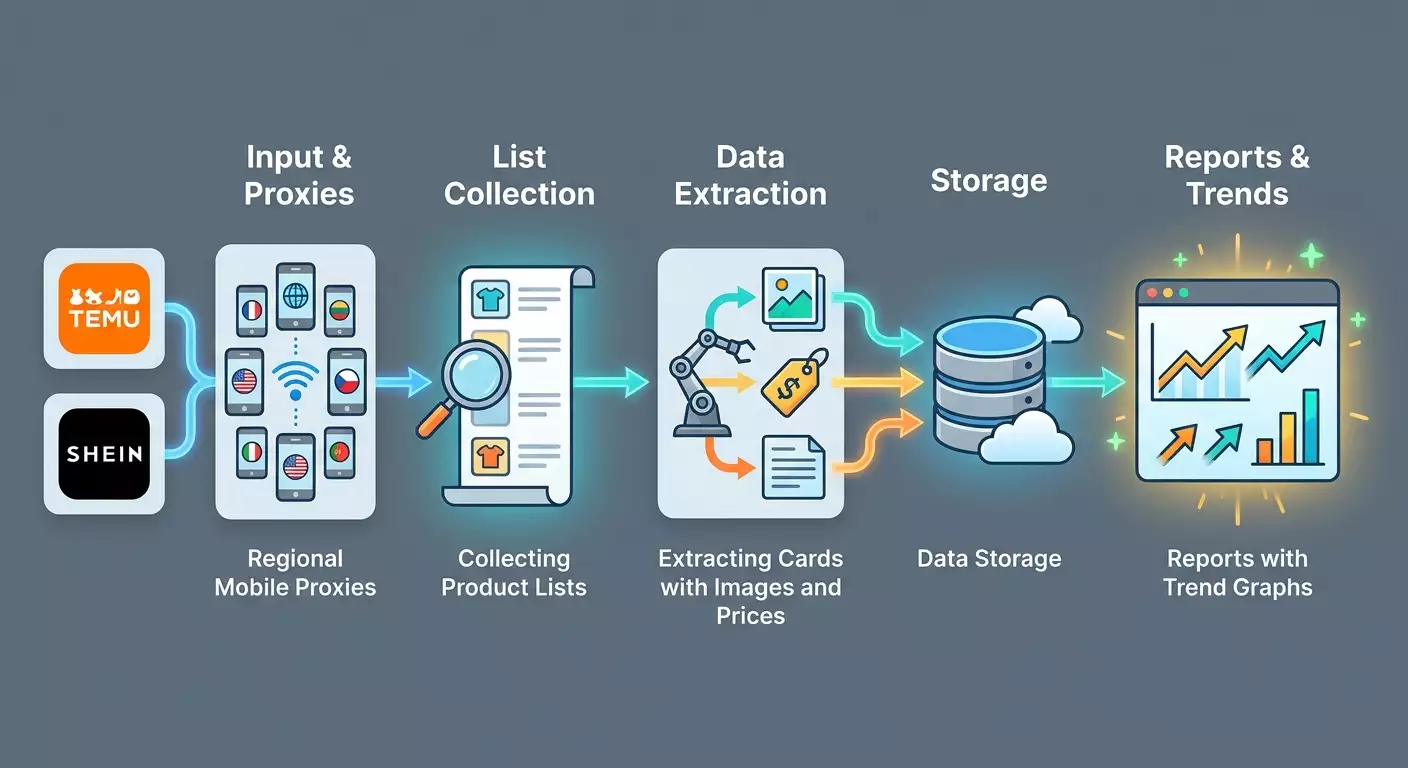
- Add steps: request list → parse cards → download images → update database → calculate metrics → generate reports.
- For reports, use tables with graphs: price history, review growth, category rankings, top scoring S.
- Save exports in CSV format with the date in the filename. Retain for at least 90 days.
- In logs, record start and end times, the number of successful cards, error counts, and average response delays.
- Set up notifications for anomalies: spikes in failures, long delays, changes in card structure.
Important Points: The simpler the data path, the fewer disruptions. Avoid unnecessary transformations, and store raw materials for re-processing.
✅ Verification: On schedule, new CSV files and updated graphs appear in the right hours; there are no anomalies in logs, and the percentage of successful cards remains consistently above 95%.
Tip: Conduct a "control sample" each week: manually open 10 cards from the report and check the accuracy of prices and attributes.
Step 12: Check the Results
Checklist
- Data and logs folders are filled with fresh files.
- Category lists and product cards are collected for each region.
- Images are downloaded and available locally.
- Price and review history is built over 7-30 days.
- S scores and top lists are generated daily.
- Proxy rotation works, and regional prices are accurate.
- Reports are updated on schedule.
How to Test
- Select 5-10 random products and compare price and availability manually with the website.
- Check currency and shipping cost accuracy.
- Ensure duplicates do not proliferate during re-runs on the same day.
Success Metrics
- 95%+ of product cards update without errors.
- Price convergence with manual checks is 98%+.
- You identify 10-20 new promising products weekly.
✅ Verification: All checklist items are completed, discrepancies are minimal, and reports aid in assortment decisions.
Step 13: Common Mistakes and Solutions
- Problem: 403 error when opening cards. Cause: too high frequency or unstable session. Solution: reduce the rate, extend sessions, switch IP, check region and headers.
- Problem: 429 error and temporary restrictions. Cause: spikes in requests. Solution: add pauses, series, timer-based rotation, and manual switches during error peaks.
- Problem: prices differ from expected. Cause: wrong region or promo conditions. Solution: check IP, currency, document the promotion, and introduce a price_confidence column.
- Problem: duplicates in the database. Cause: unaccounted regions or different IDs in the list and card. Solution: use a composite key of source + region + product_id, normalize titles.
- Problem: images do not download. Cause: outdated CDN links. Solution: download immediately during card scraping and store locally; add image_hash.
- Problem: unstable review collection. Cause: dynamic loading. Solution: save XHR responses, repeat the request after a brief pause, log the total and delta.
- Problem: reports are "empty" in the mornings. Cause: scheduler not running. Solution: check the schedule, logs, available disk space.
Tip: Conduct a data schema audit once a month: remove unnecessary fields, add missing ones to keep reports precise and quick.
Step 14: Advanced Features
Advanced Settings
- Extended scoring considering visual tags: analyze dominant colors, title length, and keyword count.
- Promo signals: alerts when the price drops below the median by 20% or more.
- Separate browser profiles by market with unique language and date format settings.
Optimization
- Cache HTML and JSON for re-processing without new requests.
- Reduce parallelism during peak hours.
- Hash images for duplicate control and space-saving.
What Else Can Be Done
- Link your scoring with your store catalog to automatically select cards for advertising campaign tests.
- Add manual tags like "quality fabric" or "suitable for gifts" to train scoring based on your preferences.
- Create a comparison showcase of Temu vs Shein by categories and regions to see where prices or trends diverge.
If you plan to expand into more regions, assess the availability of mobile IPs and the stability of carriers in advance. Here again, the latency map, proxy checker, and connection cost calculator will help. For scaling across several markets, including rare regions, it’s convenient to use a mobile proxy pool with broad geographic coverage and simultaneous HTTP(S) and SOCKS5 support. In 2026, many choose MobileProxy.Space due to its large pool of IPs, timer-based rotation management, API or link support, and 24/7 availability. Remember the promo code YOUTUBE20 for a 20% discount on your first purchase, and don't forget to utilize their free IP and DNS checking utilities.
FAQ
- Can I get by without code? Yes, use a browser, save HTML, and tables. However, automation saves time and reduces errors.
- How often should data be updated? For trendy categories - 1-2 times a day, for stable ones - 2-3 times a week.
- What to do if a verification for suspicious activity appears? Reduce frequency, wait 10-30 minutes, change IP, and repeat later in small portions.
- How to determine the region correctly? Match IP and currency along with shipping conditions. Use IP check, DNS test, and latency map for routes.
- How to store images without chaos? Use naming conventions with product_id and image_hash, organize folders by source and date.
- Why do review counts sometimes not grow? It might be a seasonal pause or delay in review publication. Look at both 7-day and 14-day windows.
- How to account for different pricing variants? Fix the card price and variant prices while using the minimum, maximum, and median in metrics.
- Can I directly compare Temu and Shein? Yes, by matching categories and markets. Standardize prices in a common currency and consider shipping.
- What to do if the page structure changes? Update field extraction rules, manually check 10-20 cards, and document changes in the log.
- How to spot trends faster? Sort by review growth over 7 days and discount depth relative to the median category, then check visual trend tags.
Conclusion
You have gone through a complete cycle: identified goals and metrics, prepared the environment, considered the anti-bot features of Temu and Shein, collected category lists, scraped cards, images, and prices, structured data, implemented daily automation, built scoring and demand forecasting. Now you have a stable process that helps find and validate winning products for dropshipping.
What to do next: expand regions and categories, add new attributes to scoring, and improve forecast quality by incorporating history and new factors. Integrate reports with your store to launch test sales faster.
Where to develop: deepen seasonal analytics, identify early signals of trends, experiment with card content formats and visual tags. Regularly check mobile proxy settings and regional parameters to ensure your data always reflects the real picture. Remember that for accurate price and assortment display, it is critical to have a session in the required region. Mobile proxies with broad geography, flexible rotation, and verification tools help with this. Among the convenient solutions in 2026 is MobileProxy.Space, where 218+ million IPs from 53+ countries are available on real carriers' SIM cards, simultaneous HTTP(S) and SOCKS5 support, timer-based rotation, API or linking, 3 hours of free testing, and 24/7 support. Don't forget to use the promo code YOUTUBE20 for a discount on your first purchase.